现象描述:
- Failed to connect to github.com port 443 after 21100 ms: Could not connect to server。
- 可以ping通github,浏览器也可以访问github官网,但是git访问不了。
bash
(GPTSoVits) PS D:\Gen24\Projects> git clone https://github.com/RVC-Boss/GPT-SoVITS.git
Cloning into 'GPT-SoVITS'...
fatal: unable to access 'https://github.com/RVC-Boss/GPT-SoVITS.git/': Failed to connect to github.com port 443 after 21100 ms: Could not connect to server结论:浏览器设置了代理,但 Git 没有,所以我们要为 Git 配上本地代理。
解决方法:
step1: 查看git有没有配置过代理
bash
# 查看全局 HTTP 代理 \
git config --global --get http.proxy
# 查看全局 HTTPS 代理
git config --global --get https.proxy
如果没有输出,则没有给git配置过代理。
step2: 查看当前代理软件的代理地址、端口和代理方式,例如clash verge: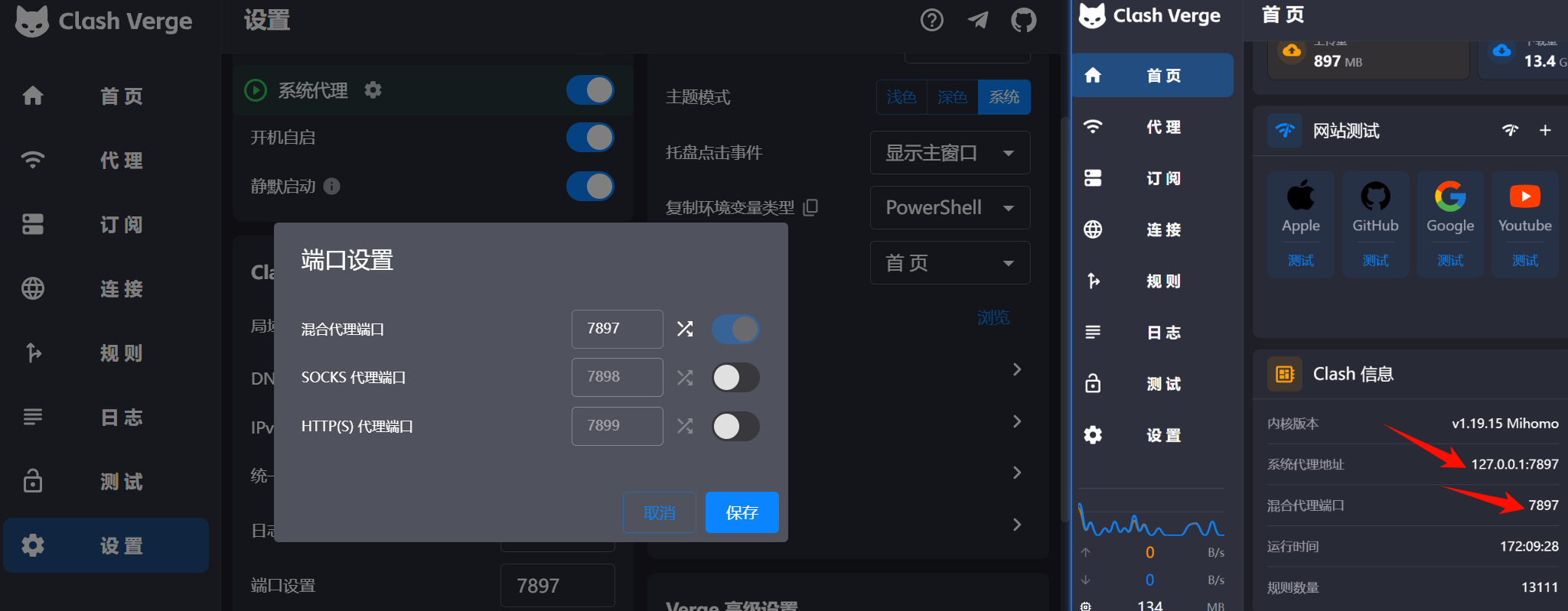
step3: 上图可看出使用的混合代理,给 Git 配置时一般推荐先用 HTTP 写法,兼容性最好:
bash
# 端口号自行替换
git config --global http.proxy  http://127.0.0.1:7897
git config --global https.proxy http://127.0.0.1:7897
配置好后可以尝试重新clone项目。
取消(清除)配置过的代理:
bash
git config --global --unset http.proxy
git config --global --unset https.proxy
git config --global --get http.proxy # 查看是否清空
git config --global --get https.proxy
问题总结:
git clone https://github.com/... 时,实际上有两层东西:
- 目标站的协议:
- 这里是
https://github.com—— 也就是 GitHub 用 HTTPS 提供服务。
- 这里是
- git软件到代理之间的协议:
- 这是
http://127.0.0.1:7897或socks5://127.0.0.1:7897—— 也就是 你和 Clash 之间怎么说话。
- 这是
bash
git config --global http.proxy  http://127.0.0.1:7897
git config --global https.proxy http://127.0.0.1:7897
意思是:
访问 http://xxx 仓库 → 用 127.0.0.1:7897 这个 HTTP 代理
访问 https://xxx 仓库 → 也用 127.0.0.1:7897 这个 HTTP 代理
大多数国内用的代理软件(包括 Clash)对外暴露的是“HTTP 代理”或者“Mixed 端口”
- 它听的是一个 明文 HTTP 协议(带 CONNECT 方法)的端口;
- 当你访问 HTTPS 站点时,流程大概是:
- Git → 用 HTTP 协议 向代理发:
CONNECT github.com:443 HTTP/1.1 - 代理同意:
HTTP/1.1 200 Connection Established - 从这之后,Git 在这个 TCP 隧道里发起 TLS 握手,和
github.com:443建立 HTTPS 连接。 所以:
- Git → 用 HTTP 协议 向代理发:
- 你到 代理 是 HTTP 协议(所以要写
http://127.0.0.1:7897); - 你到 GitHub 是 HTTPS 协议,这一层被“隧道”进去了。